


Power BI and Microsoft Teams are enabling you to view and analyze your personal Microsoft Teams activity in 1-click with a new Power BI ‘Teams activity analytics’ report – now in preview.
To try it out, just open the Power BI app in Teams, navigate to the create tab, and click “Analyze your Teams data”.

Automatically, Power BI will connect you to your personal activity data from Teams and get you started with an out-of-the box report designed to help you track your key activity in Teams.
The report helps you understand metrics like the number of meetings you’ve participated in, how much time you’ve spent sharing audio and video, and how many messages you’ve been sending. Additionally, you can see a summary of the activity for the Teams you’re a member.
Microsoft Teams has become indispensable to how we get work done and stay connected with our colleagues. This new Power BI report connects you directly to your personal Teams activity data to help you improve how you work in Teams.
Analyze your Teams Data
The option to create your personal Teams activity report is available in the Power BI app for Teams in the create tab.
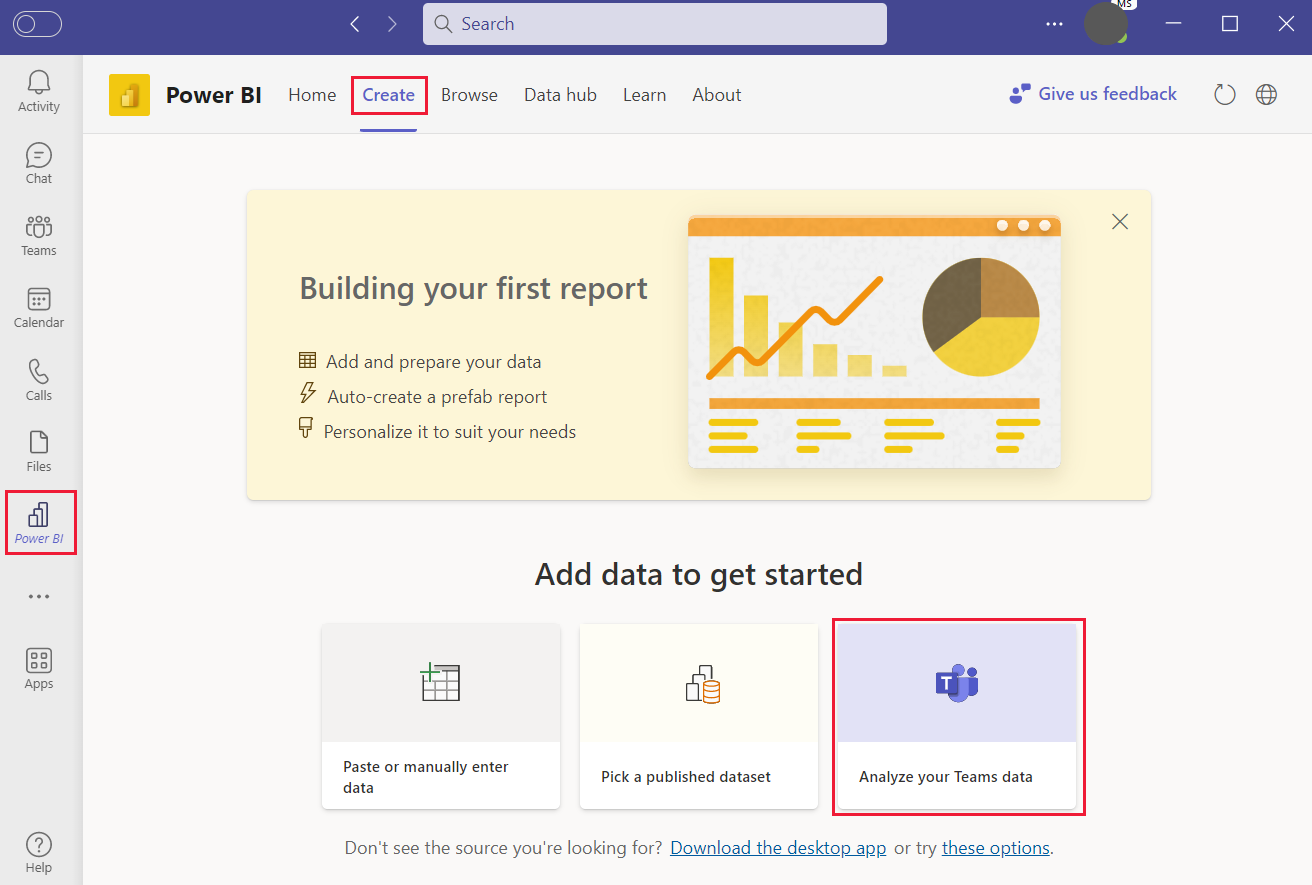
Clicking the Analyze your Teams data option automatically creates your report and populates it with your personal data. In the report you’ll find 3 pages to explore: My activity, Team activity, and Team activity details.
The “My Activity” page let’s you see how many meetings you’ve been in, how much time you’ve spent sharing your screen, audio and video, and how many chat and channel messages you’ve sent.
The “Team activity” page let’s you see summary metrics for the teams you’re a member of.

And the ‘Team activity details’ page lets you drill into a specific Team to see the overall trend for active users and engagement, as well as a smart narrative for the Team.

You can learn more about the specific Teams metrics and data Power BI connects to here.
The Teams activity analytics report is added your ‘My Workspace’ and can be accessed, favorited, and customized like any other Power BI report. It’s set to refresh once a day to pull in your latest Teams activity.

The Teams activity analytics report is currently only available in English.
We’re already working on some improvements to the report – including adding detailed metrics for the Teams channels you’re a member of. If there are other enhancements or improvements you’d like to see please let us know in the comments or through the Power BI Ideas forum.
Rolling out the Power BI app for Teams to your organization
Organizations can make it easier for everyone to find and use data by installing and pinning (optional but recommended) the Power BI app for Teams for their users. As a leader in your organization, you can encourage individuals and teams to start using the Power BI app in Teams by installing it for themselves. As a Power BI admin or a Teams admin, you can encourage broader usage by installing and even pinning the app proactively.
Read the guide to learn the options for broad and targeted roll-out to help decide what’s the right step for your organization.